

Download USB Drive Data Recovery Software – free, secure USB recovery tool
Overview
USB Drive Data Recovery Software is a comprehensive, user‑friendly solution built to rescue lost, deleted, or corrupted files from any USB‑based storage device. Whether you accidentally erased important photos, lost a batch of documents after a power surge, or need to retrieve media from a malfunctioning flash drive, this tool offers a reliable safety net. The program supports a broad range of USB media, including external hard disks, flash drives, USB MP3 players, and even portable SSDs.
Its scanning engine works at both the file‑system level and the raw sector level, ensuring that even logically damaged media can be examined and restored. The interface guides users step‑by‑step, making advanced recovery techniques accessible to beginners while still providing power users with customizable scan parameters. In addition to standard file types such as DOC, PDF, MP3, JPEG, and MP4, the software can recognize and rebuild less common formats, which is especially valuable for photographers and videographers who rely on proprietary RAW files.
By supporting major brands like Kodak, Nikon, Toshiba, and many others, the application minimizes compatibility concerns and maximizes the chance of successful recovery. Security‑focused developers have also embedded a sandboxed environment, meaning the recovery process never writes to the original USB drive, preserving data integrity throughout the operation.
Key Features
- Deep scan for deleted, corrupted, or inaccessible files on any USB media.
- Support for over 300 file formats, including DOC, PDF, MP3, JPEG, MP4, RAW, and more.
- Logical and physical damage recovery modes for severely damaged drives.
- Brand‑specific optimization for devices from Kodak, Nikon, Toshiba, SanDisk, and others.
- Preview function that lets users view recoverable files before committing to restore.
- Secure sandboxed recovery environment to prevent further data loss.
- One‑click recovery for beginners and advanced filter options for power users.
- Automatic update system that keeps the scanning engine current with the latest file system changes.
- Multi‑language interface with support for English, Spanish, German, French, Chinese, and Japanese.
- Free trial version that allows recovery of up to 200 MB of data without purchase.
Installation, Usage & Compatibility
Step‑by‑Step Installation
Downloading the installer is straightforward—simply click the “Download Free Trial” button on the official website. The installer is a lightweight .exe for Windows and a .dmg for macOS. After the download completes, run the installer and follow the on‑screen prompts: accept the license agreement, choose the destination folder, and let the wizard copy the necessary files. The entire process typically takes under three minutes on a modern PC.
How to Use the Tool Effectively
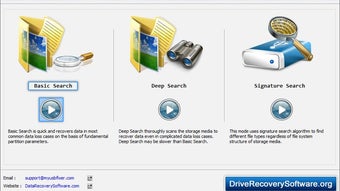
Once installed, launch the application. The home screen presents three main options: Quick Scan, Deep Scan, and Advanced Settings. For most users, the Quick Scan will locate recently deleted files within seconds.
If the Quick Scan returns no results, select Deep Scan; this mode examines the raw sectors of the USB drive and can recover files that have been overwritten or corrupted. After the scan completes, the software displays a sortable list of recoverable items with thumbnails for images and audio playback for media files. Users can select individual files or groups, then click “Recover” and specify a safe destination—**never** the original USB drive, as this could overwrite remaining data.
The recovered files are saved with their original metadata intact.
Operating System Support
The software is compatible with Windows 10, Windows 11, and Windows Server 2016/2019 (both 32‑bit and 64‑bit). A macOS version is available for macOS 10.13 (High Sierra) and later, supporting both Intel and Apple Silicon chips. While a native Linux version is not offered, the Windows installer can run under Wine for advanced users. Mobile platforms (Android, iOS) are not currently supported, as USB recovery typically requires direct low‑level access to the storage device, which mobile operating systems restrict for security reasons.
Pros, Cons & Frequently Asked Questions
Pros
- Highly effective deep‑scan algorithm recovers data from both logical and physical damage.
- Broad file‑format support, including niche media types.
- User‑friendly interface suitable for beginners.
- Secure sandboxed recovery prevents accidental overwriting.
- Free trial allows testing before purchase.
Cons
- No native Linux or mobile app version.
- Full version requires a one‑time payment; free version limits recovery size.
- Deep scans can be time‑consuming on very large drives (up to several hours).
FAQ
Can I recover files from a USB drive that won’t mount in Windows?
Yes. The software includes a physical‑damage recovery mode that bypasses the operating system’s mount process, allowing sector‑level scanning even when the drive is not recognized by Windows.
Is the recovered data safe from viruses?
The application runs in a sandboxed environment and never writes directly to the source USB drive. However, it’s recommended to scan recovered files with an up‑to‑date antivirus before opening them.
How much does the full version cost?
The perpetual license is priced at $49.99 USD, which includes free updates for one year and lifetime technical support.
Can I recover encrypted files?
Encrypted files can be recovered, but they remain encrypted. You will need the original decryption key or password to access the contents after recovery.
Does the software support batch recovery?
Yes. After scanning, you can select multiple files or entire folders and recover them in a single operation, saving time on large‑scale data loss events.
Overall, USB Drive Data Recovery Software offers a robust set of features that make it one of the most reliable tools on the market for USB media restoration. Its intuitive design, combined with powerful deep‑scan capabilities, delivers excellent results for both casual users and professionals.
Conclusion & Call to Action
If you rely on USB drives for everyday storage, accidental deletions or hardware glitches can be disastrous. USB Drive Data Recovery Software provides a secure, efficient, and affordable way to bring back lost photos, important documents, and treasured media. With a free trial that lets you test its capabilities before committing, there’s little risk in giving it a try. Click the button below to download the free version, run a quick scan, and experience firsthand how quickly your missing files can be restored. For full access to deep‑scan and unlimited recovery, consider upgrading to the paid license—your data’s safety is worth the investment.







